Overleaf is the default choice for LaTeX in academia. But its free plan limits how many people can collaborate and how long a project may compile. If you need more than that and would rather not pay, ScienHub is an alternative.
Limitations of Overleaf's free plan
Overleaf's free plan comes with the following limits:
- A cap on collaborators — a free project supports at most 2 people; beyond that you need a paid plan.
- Compile timeouts — free projects have a compile-time limit. Long papers with many figures routinely time out.
- No Git sync — Git integration requires a paid plan.
For a solo researcher writing a short paper, the free Overleaf tier is fine. For any collaborative work — a lab group, a co-authored paper, a thesis with an advisor — you quickly run into these walls.
What ScienHub offers
ScienHub is a browser-based LaTeX editor built specifically for collaborative scientific writing. Everything is free.
Real-time collaboration — actually free
ScienHub uses Yjs, a conflict-free replicated data type (CRDT), to sync edits between collaborators in real time. Multiple people can type in the same document simultaneously with no locks, no "someone is editing" messages, and no merge conflicts. This is available on the free plan, with no seat limit.
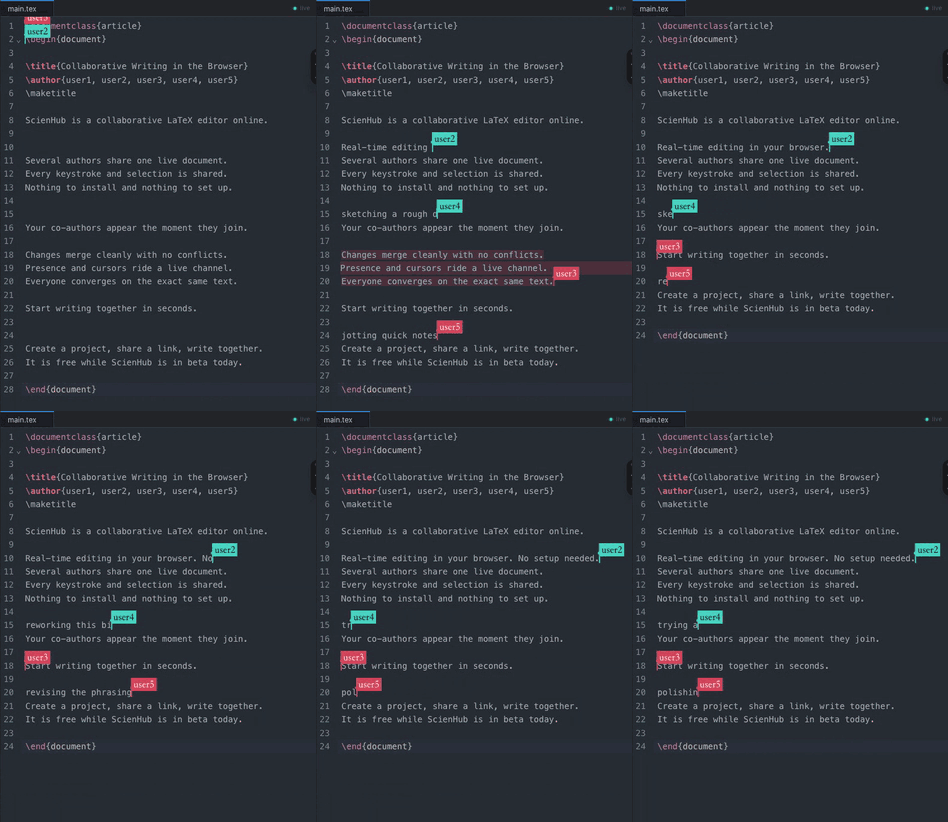
Real-time multi-user collaboration in the ScienHub editor
Inviting a collaborator to edit together in ScienHub
Instant compilation
ScienHub compiles LaTeX on dedicated build servers with no timeout. A 200-page thesis with 50 figures compiles just as reliably as a two-page abstract.
Git version control — built in
Every ScienHub project is a Git repository. You get full version history, the ability to branch and merge, and integration with your existing Git workflow — all without a paid plan.
No installation
You open a browser. That's it. No TeX Live, no MikTeX, no VS Code extension to configure. ScienHub runs entirely in the browser with a full LaTeX distribution on the server side.
Comparison
| Feature | Overleaf Free | ScienHub |
|---|---|---|
| Collaborators | Up to 2 | Unlimited |
| Compile time | Limited | Unlimited |
| Git integration | ✗ (paid only) | ✓ Free |
| Price | Free (limited) | Free |
Who ScienHub is for
ScienHub is built for:
- Lab groups writing joint papers where multiple co-authors need to edit simultaneously
- Thesis students working closely with an advisor who needs to review and comment in real time
- Conference paper sprints where a team is writing under deadline pressure
- Anyone hitting Overleaf's compile timeout on a large document
免费 Overleaf 平替
对于中国的研究者,ScienHub 同样完全可用。无需翻墙,无需安装任何软件,直接在浏览器中打开即可开始写作。 实时协作、Git 版本控制、LaTeX 编译,全部免费。
中国用户使用scienhub.cn访问更快,速度更稳定。